
This website stores cookies on your computer. These cookies are used to improve your website experience and provide more personalized services to you, both on this website and through other media.
Accept
EdTechReviewEdTechReview
  • News
  • Trends
  • Insight
  • eLearning
  • Research
  • Dictionary
  • EdTech Voices
  • More
    • Data & Statistics
    • Reviews
    • AWS for Education
    • Events

    Resources

    • Infographics
    • Reports & Case Studies
    • Videos
    • Books
    • Webinar

    Needs

    • 1:1 Learning
    • 21st Century Education
    • 21st Century Leadership
    • 21st Century Learning
    • 21st Century Teaching
    • 3D Printing
    • More Tags

    For

    • Students
    • Teachers/Educators
    • Administrators
    • Entrepreneurs/Startups
    • Govt. Officials/Policymakers
    • Parents
Explore
Search
Contribute
  • Submit A Post
  • EdTech Trainers and Consultants
  • Your Campus EdTech
  • Your EdTech Product
  • Your Feedback
  • Your Love for Us
  • EdTech Product Reviews
ETR Resources
  • About
  • Mission/Vision
  • Team
  • Services
  • Testimonials
  • Authors
  • Sponsor
  • Partner
  • Advertise
  • Our Clients
  • Media Kit
  • Press Release
  • FAQ’S
Reading: An Easy-to-Use Authoring Tool For Designing Courses Like A Pro
Aa
EdTechReviewEdTechReview
Aa
Search
  • News
  • Trends
  • Insight
  • eLearning
  • Reviews
  • Dictionary
  • EdTech Voices
  • Data & Statistics
  • Research
  • AWS for Education
  • Events
  • EdTech Voices
  • Tags
  • About
  • FAQ’S
  • Our Clients
  • Partner
Follow US
Home > eLearning > An Easy-to-Use Authoring Tool For Designing Courses Like A Pro
eLearning

An Easy-to-Use Authoring Tool For Designing Courses Like A Pro

Sofia Green
Sofia Green Published Jul 15, 2022
Share
6 Min Read
An Easy-to-Use Authoring Tool For Designing Courses Like A Pro
SHARE

Online courses have gained recognition worldwide, and if you’re entering this field, you’re probably looking for a pain-free way to create courses best suited for your application.

Contents
Create courses from existing PPT slidesAdd engaging knowledge checksDevelop communication skills with interactive role-playsEducate and engage through videoSummary
AdvertisementWhy this Ad?

Luckily, not all course authoring tools are too complex to master.

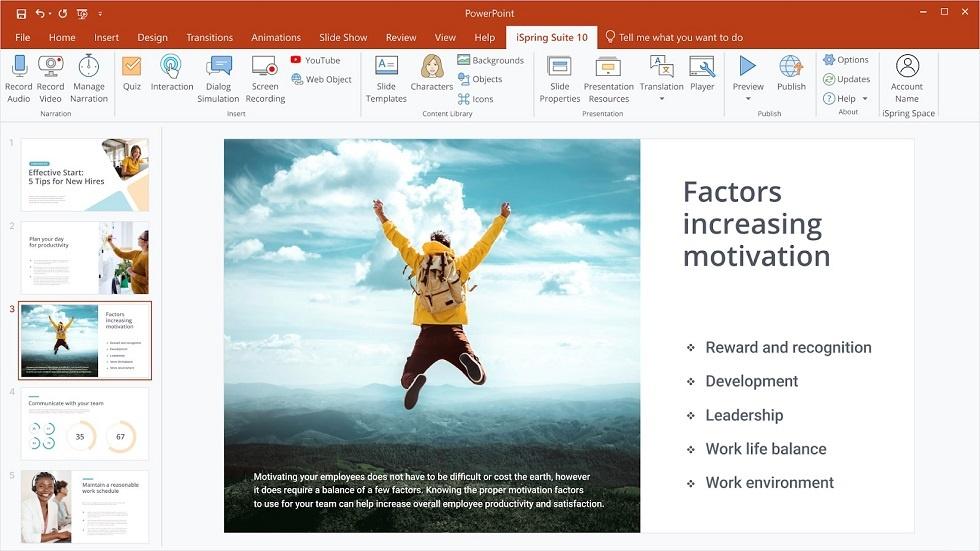
Both eLearning newbies and seasoned L&D professionals can develop great courses with quizzes, interactive role-plays, audio, video, and web objects using PowerPoint-based tools. In this article, you’ll learn about one of them – iSpring Suite.

iSpring Suite tool includes features that enable you to create multimedia courses and assessments straight out of the box.

Create courses from existing PPT slides

You can make an online course from a regular PPT presentation. Everyone who ever used PowerPoint already knows how to work with iSpring Suite. It aligns with the ‘what you see is what you get’ principle. Plus, as an add-in to PowerPoint, iSpring Suite won’t require a large storage capacity or powerful hardware, which is perfect for public sectors and beginning instructional designers.   

iSpring Suite can convert anything into eLearning quickly and without a hitch. For example, you can take your Word files or PDFs and transform them into interactive HTML5 books that can be shared and viewed in any browser. 

If you use a learning management system, you can be sure that courses made with iSpring Suite will display in your LMS perfectly. iSpring Suite is compatible with more than 150 LMSs and can convert learning materials to SCORM, cmi5, and xAPI eLearning standards.

Add engaging knowledge checks

iSpring Suite combines a user-friendly interface with powerful authoring capabilities. For instance, you can build courses with 14 different types of quiz questions, including drag-and-drop, sequence, and hotspot. Choose any of them from ready-made templates and add them to your PPT presentation to engage learners and assess their knowledge.

ispring-authoring-tool-2

Develop communication skills with interactive role-plays

If it’s a priority to train learners on soft skills or recommended behaviour patterns in any given situation, use iSpring Suite to build interactive role-plays. For example, role-plays can help you train employees on sales techniques, objection handling, and conflict management to improve customer service and boost sales. 

ispring-authoring-tool-3

The process of creating role-play scenarios in iSpring Suite is completely accessible and doesn’t require coding skills. You can easily set branching scenarios to send learners to a needed slide depending on their choice and select characters and locations to immerse learners into the context of a given scenario.

Interactive role-plays are especially helpful if you don’t have enough time and space to facilitate group work or don’t want to risk sending unprepared learners to interact with real clients yet. Such scenario-based exercises stimulate learners to practice their communication skills, memorize sales techniques, or learn to make important decisions in a safe-to-fail digital environment. 

Educate and engage through video

With iSpring Suite, you can easily record video lectures, watch-and-repeat tutorials, software simulations, and other visual content – even using an ordinary webcam on your laptop. Record yourself and place the video as a picture-in-picture clip into your course to support learners with your narration. Or you can add a voice-over to your course and use iSpring Suite to synchronize voice and video slides. All these functions are available in the familiar PowerPoint interface and don’t require extra video editing software. 

Summary

For course creators with any level of tech proficiency, iSpring Suite provides all the features needed to accomplish eLearning projects on time and meet the needs of their company or customers.  

  • Meaningful assessments. iSpring Suite provides a wide range of knowledge checks and adjustable quiz settings so you can create graded quizzes, set feedback options, etc.    
  • Engaging interactions. iSpring Suite lets you make game-based interactive training materials and go beyond simple multiple-choice questions.
  • Built-in video studio.  You can record video tutorials, screencasts, and picture-in-picture videos and edit them hassle-free.
  • Interactive role-plays.  You can create role-play simulations to let employees practise communication skills in a digital environment.  
  • Extensive publishing options. iSpring Suite allows you to publish courses in SCORM, xAPI, and cmi5 and upload them as videos directly to YouTube. For mobile learning, it supports conversion to HTML5 content. 
  • Playback on all devices.  Courses display well on PCs, smartphones, and tablets, keeping all effects intact.  

Utilize all the power of iSpring Suite to turn your PPT presentation into a compelling online course! If you need a hint on how to map out your course to address learning needs most effectively, download this eLearning storyboard template today – it’s free!

TAGGED: Authoring, Corporate Learning, CorporateTraining, E-Learning, Multimedia, Online Courses, Tools in Education, Workplace Learning
Share This Article
Facebook Twitter Whatsapp Whatsapp LinkedIn Reddit Telegram Email Copy Link
Previous Article upGrad Acquires Recruitment & Staffing Platform WOLVES India To Strengthen Its Tech Placement Portfolio upGrad Acquires Recruitment & Staffing Platform WOLVES India To Strengthen Its Tech Placement Portfolio
Next Article Assurance Of Learning Through Simulations Assurance Of Learning Through Simulations
AdvertisementWhy this Ad?

Latest EdTech News To Your Inbox

Stay Connected

AdvertisementWhy this Ad?

Latest EdTech News To Your Inbox

Stay Connected

AdvertisementWhy this Ad?

You Might Also Like

upEducators Top Choice for Becoming a Nursery Teacher in India
News

Why is upEducators the Top Choice for Nursery Teacher Training (NTT) Course in India?

Jul 7, 2026
Stop Teaching Students More Apps Teach Them How to Handle Files
eLearning

Stop Teaching Students More Apps, Teach Them How to Handle Files

Jul 3, 2026
From Consumers to Creators How to Turn Your Kids Summer Screen Addiction Into a Productive Skill Lab
eLearning

From Consumers to Creators: How to Turn Your Kid’s Summer Screen Addiction Into a Productive ‘Skill Lab’

Jun 30, 2026
Top 7 AI Leadership & Business Administration Programs for Executives in 2026
eLearning

Top 7 AI Leadership & Business Administration Programs for Executives in 2026

Jun 25, 2026
Shortening the software learning cycle in a world of rapid releases
Insight

Shortening The Software Learning Cycle in a World of Rapid Releases

Jun 23, 2026
Why Most Online Courses Dont Have a Content Problem They Have a Completion Problem
eLearning

Why Most Online Courses Don’t Have a Content Problem, They Have a Completion Problem.

Jun 18, 2026
How AI Tools Are Changing the Way We Work Learn and Create
Trends

How AI Tools Are Changing the Way We Work, Learn, and Create

Jun 9, 2026
10 Best Online Education Masters Programs to Advance Your Teaching Career
eLearning

10 Best Online Education Master’s Programs to Advance Your Teaching Career

Apr 16, 2026
Show More
EdTechReviewEdTechReview

H433, 2nd Floor, Vikaspuri, New Delhi, India, 110018
Phone: 011 41321030

Follow US

Copyright © EdTechReview. All Rights Reserved.

  • Home
  • Advertise
  • Event Associations
  • Press Release
  • About
  • Services
  • Contribute
  • News
  • Trend & Insight
  • Data & Statistics
  • eLearning
  • Reviews
  • Research
  • EdTech Voices
  • Dictionary
  • Tags
  • Resources
  • Events
  • Courses
  • EdTech Product for Review
  • Sponsored/Paid Post Service
  • Our Clients
  • FAQ’S
  • Contact Us
  • Important Links
  • Sitemap
  • Terms of Use
  • Privacy Policy
newsletter
Join 100K+ subscribers!

Subscribe to our weekly newsletter that brings the latest EdTech news, trends, insights, reports, interviews, etc. for educators, school leaders, entrepreneurs, investors, & others.

loader
Zero spam, Unsubscribe at any time.
Go to mobile version
Welcome Back!

Sign in to your account

Lost your password?