

This website stores cookies on your computer. These cookies are used to improve your website experience and provide more personalized services to you, both on this website and through other media.
Accept
EdTechReviewEdTechReview
  • News
  • Trends
  • Insight
  • eLearning
  • Research
  • Dictionary
  • EdTech Voices
  • More
    • Data & Statistics
    • Reviews
    • AWS for Education
    • Events

    Resources

    • Infographics
    • Reports & Case Studies
    • Videos
    • Books
    • Webinar

    Needs

    • 1:1 Learning
    • 21st Century Education
    • 21st Century Leadership
    • 21st Century Learning
    • 21st Century Teaching
    • 3D Printing
    • More Tags

    For

    • Students
    • Teachers/Educators
    • Administrators
    • Entrepreneurs/Startups
    • Govt. Officials/Policymakers
    • Parents
Explore
Search
Contribute
  • Submit A Post
  • EdTech Trainers and Consultants
  • Your Campus EdTech
  • Your EdTech Product
  • Your Feedback
  • Your Love for Us
  • EdTech Product Reviews
ETR Resources
  • About
  • Mission/Vision
  • Team
  • Services
  • Testimonials
  • Authors
  • Sponsor
  • Partner
  • Advertise
  • Our Clients
  • Media Kit
  • Press Release
  • FAQ’S
Reading: Best Tools to Teach Students With Visual-Impairment at Home
Aa
EdTechReviewEdTechReview
Aa
Search
  • News
  • Trends
  • Insight
  • eLearning
  • Reviews
  • Dictionary
  • EdTech Voices
  • Data & Statistics
  • Research
  • AWS for Education
  • Events
  • EdTech Voices
  • Tags
  • About
  • FAQ’S
  • Our Clients
  • Partner
Follow US
Home > Trend & Insight > Insight > Best Tools to Teach Students With Visual-Impairment at Home
Insight

Best Tools to Teach Students With Visual-Impairment at Home

Saniya Khan Published Jul 2, 2020
Share
7 Min Read
Best Tools to Teach Students With Visual-Impairment at Home
SHARE

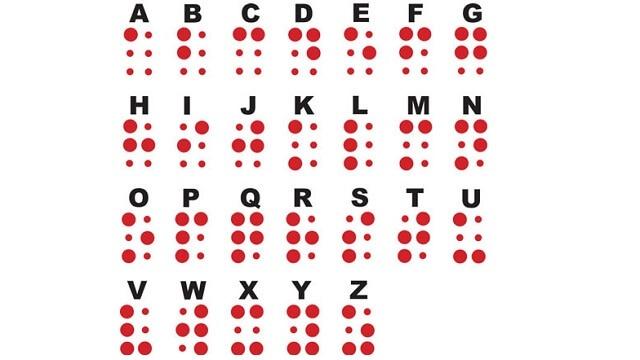
Amidst this school closure to help stop the spread of COVID-19, it is challenging for both the teacher and students to continue their learning, they had to make a paradigm shift to remote learning. But, what about those blind or visually-impaired students?

Contents
SCENEEYE 500 –BRAILLE COMPASS –VIDEO MAGNIFIER –BRAILLENOTE APEX NOTE TAKER –EMBOSSER –VOICEOVER (in OS X & iOS)AUDIBLEBlind Babies Foundations ​Blind Children’s CenterDots for Families
AdvertisementWhy this Ad?

How are they learning remotely? Being a fully sighted individual, it’s hard to really for us to understand the struggle a visually impaired or blind student goes through while learning be it at school or home. According to the American Foundation for the Blind, each student’s vision needs are individual to them, which can be categorized as Myopia, Amblyopia, Hyperopia etc. and it’s important that these students have access to a Certified Teacher for the Visually Impaired (TVI) and/or a Certified Orientation and Mobility Specialist (COMS) for consultation and professional input. But how can they be taught at home during this worldwide lock down? What tools can parents implement now for teaching their visually-impaired children?

Herein, we’ve compiled a list of tools, especially designed for these students.

  1. SCENEEYE 500 –

SceneEye 500 is a portable desktop camera with exceptionally intuitive user interface specifically designed for use with touch screen tablets. This easy to connect device magnifies the image by up to 50X making it easy for a visually impaired student to see the blackboard or any classroom presentation. Contrast feature is also adjustable to make the image even easier to read. Visually impaired students can even record the images for later viewing in class or at home, giving them a permanent study aid in what is being taught in class. This assistive device only works with Windows 7 or Windows 8.

  1. BRAILLE COMPASS –

Using Braille imposed tracing wheel, this compass from Howe Press help blind students to complete math tasks with no assistance. The point end works the same as on regular compasses, but the students are able to read the tracing wheel with their finger and make adjustments according to their needs.

  1. VIDEO MAGNIFIER –

With a large 7’’ display, the Olympia video magnifier is a portable device that enables visually impaired students to follow along in their textbooks and read and complete worksheets. Video magnifier features a range of magnification settings as well as a tilt screen for optimal viewing. It can be used in the classroom or at home and has no limitations in the type of text it is able to view.

  1. BRAILLENOTE APEX NOTE TAKER –

Developed by Human Ware, Braille note apex note taker is a portable word processor that allows a blind or visually – impaired student to type notes in Braille and later convert them to an audio or print them out. BrailleNote offers an array of features including three USB ports and synchronization with your home computer.

  1. EMBOSSER –

The ViewPlus Max Embosser is the fastest and most versatile Desktop series braille printers. It allows the user to print anything from their home computer that has been translated into Braille. Having a versatile unit like this at home will make it easy for the parents of a blind student convert their schoolwork into readable materials.

  1. VOICEOVER (in OS X & iOS)

VoiceOver is an in-built feature in iOS device that reads out everything on the screen of your phone — the icons, the menus, the features, the emails, the social media feed, as well as any Web pages loaded. It also assists users when using the keyboard so that they know exactly what they are typing. In addition, its ‘rotor’ function allows users to give a number of commands such as skim through Web pages or spellcheck documents. The built-in voice speaker can be accessed in 30 different languages, making it useful for students of any country.

  1. AUDIBLE

Another iOS app Audible is the top favourite audio book app for the visually-impaired students. They could listen to new material or book through this app, also allow students to learn the correct phonetic sounds and pronunciation of words in the real-time. It is a great source to help students memorize material by listening and speaking along with the recorded voice .Not only this, the app remembers where you left off the last time and resumes the audio book from that point. And since it integrates with VoiceOver in iOS devices, navigating within the app is not difficult.

Besides these, parents can also take help from the following online resources:

  • Blind Babies Foundations ​

The Blind Babies Foundations was established with a mission to provide family centered services to support children’s optimal development and access to the world. Later, in the year 2014, the foundation became a program of Junior Blind. The website provides parent education and resources including a fact sheets on CVI (also available in Japanese), ROP, retinal diseases, optic nerve hypoplasia, and albinism.

  • Blind Children’s Center

The Blind Children’s Center is a family centered organization supporting children with visual impairments. It offers a range of publications and resources including educational books, booklets and videos.

  • Dots for Families

Dots for Families is designed for family members, teachers of kids with visual impairments, and others interested in promoting literacy opportunities for young children with visual impairments.

If you’re looking to help your child learn and succeed, even in this crisis, then do try these amazing tools; also as we are in an ever-changing space keep adding newer tools.
Img Src

TAGGED: Free Apps and Tools, Parents, Special Education, Tools for Parents, Tools in Education
Share This Article
Facebook Twitter Whatsapp Whatsapp LinkedIn Reddit Telegram Email Copy Link
By Saniya Khan
I am Saniya Khan, Copy-Editor at EdTechReview - India’s leading edtech media. As a part of the group, my aim is to spread awareness on the growing edtech market by guiding all educational stakeholders on latest and quality news, information and resources. A voraciously curious writer with a dedication to excellence creates interesting yet informational pieces, playing with words since 2016.
Previous Article Role Technology Plays In Dysgraphia Friendly Classroom Tools & Tips Role Technology Plays In Dysgraphia Friendly Classroom: Tools & Tips
Next Article Alexa EdTech Challenge 2020 Announcing Amazon Alexa EdTech Skills Challenge 2020 (India) finalists and competition date
AdvertisementWhy this Ad?

Latest EdTech News To Your Inbox

Stay Connected

AdvertisementWhy this Ad?

Latest EdTech News To Your Inbox

Stay Connected

AdvertisementWhy this Ad?

You Might Also Like

The Most Important Variable in Education Isnt AI
Insight

The Most Important Variable in Education Isn’t AI – What Building Live Instruction at Scale Actually Taught Me

Jun 26, 2026
Why AI-Powered Personalized Learning Is Becoming the New Standard in EdTech
Insight

Why AI-Powered Personalized Learning Is Becoming the New Standard in EdTech

Jun 25, 2026
EdTech in 2026 - Are We Actually Learning or Just Watching
Insight

EdTech in 2026 – Are We Actually Learning or Just Watching?

Jun 24, 2026
Shortening the software learning cycle in a world of rapid releases
Insight

Shortening The Software Learning Cycle in a World of Rapid Releases

Jun 23, 2026
How EdTech Platforms Are Empowering Students with Flexible Learning Opportunities
Insight

How EdTech Platforms Are Empowering Students with Flexible Learning Opportunities

Jun 22, 2026
Why Enrollment Strategy Is Becoming a Campus-Wide Conversation
Insight

Why Enrollment Strategy Is Becoming a Campus-Wide Conversation

Jun 12, 2026
How AI Tools Are Changing the Way We Work Learn and Create
Trends

How AI Tools Are Changing the Way We Work, Learn, and Create

Jun 9, 2026
Dr Varun Vohra 1 career counsellor in india Guiding School Students
Insight

The Role of a Career Counsellor: Why Career Guidance and Career Counselling Matter More Than Ever in Indian Schools

Jun 2, 2026
Show More
EdTechReviewEdTechReview

H433, 2nd Floor, Vikaspuri, New Delhi, India, 110018
Phone: 011 41321030

Follow US

Copyright © EdTechReview. All Rights Reserved.

  • Home
  • Advertise
  • Event Associations
  • Press Release
  • About
  • Services
  • Contribute
  • News
  • Trend & Insight
  • Data & Statistics
  • eLearning
  • Reviews
  • Research
  • EdTech Voices
  • Dictionary
  • Tags
  • Resources
  • Events
  • Courses
  • EdTech Product for Review
  • Sponsored/Paid Post Service
  • Our Clients
  • FAQ’S
  • Contact Us
  • Important Links
  • Sitemap
  • Terms of Use
  • Privacy Policy
newsletter
Join 100K+ subscribers!

Subscribe to our weekly newsletter that brings the latest EdTech news, trends, insights, reports, interviews, etc. for educators, school leaders, entrepreneurs, investors, & others.

loader
Zero spam, Unsubscribe at any time.
Go to mobile version
Welcome Back!

Sign in to your account

Lost your password?